Navigating with Breadcrumbs
Use Breadcrumbs to identify your current location in BIMWorkplace and quickly navigate between Workplaces, Projects, Modules, and pages.
Breadcrumbs display the path to your current location, allowing you to move between different areas of the platform without returning to the main navigation menu.
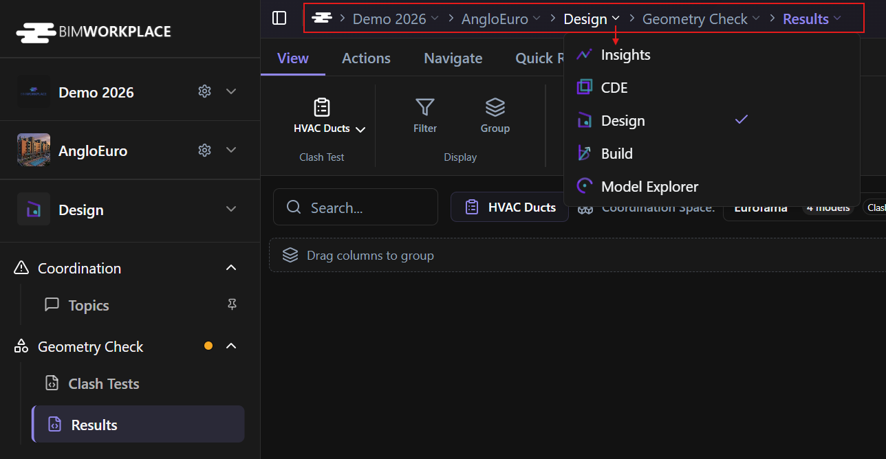
Navigating with breadcrumbs
- Locate the breadcrumbs at the top of the main content area.
- Review the navigation path to identify your current Workplace, Project, Module, and page.
- Click the level you want to change.
- Select the desired destination, when applicable.
You can use breadcrumbs to:
- Switch Workplaces: navigate to another Workplace you have access to.
- Switch Projects: open a different Project within the selected Workplace.
- Switch Modules: move between available modules, such as CDE, Design, Build, or Explorer.
- Navigate between pages: access different sections and pages within a module.
For example, while working in Design > Geometry Check > Results, you can use the breadcrumbs to switch to another module or project without returning to the main navigation menu.
Understanding the navigation path
The breadcrumb path reflects your current location in BIMWorkplace.
The available destinations depend on your access and permissions to Workplaces, Projects, Modules, and pages.
As you navigate, the breadcrumb path updates to reflect your new location.
Este artigo foi útil?