Ribbon
The Ribbon provides access to the commands and tools available on the current page in BIMWorkplace.
It is located at the top of the main content area and organizes related commands into tabs and groups, making it easier to find the actions you need.
The available tabs and commands depend on the module, page, and your permissions.
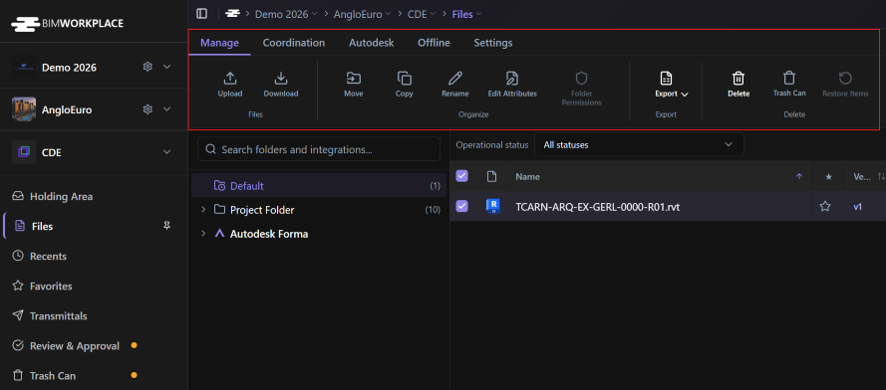
Using the Ribbon
- Open the module and page where you want to perform an action.
- Select the relevant Ribbon tab, such as Manage or Navigate.
- Locate the command you want to use.
- Select any required items, if applicable.
- Click the command to perform the action.
Some commands are only available when you select an item, such as a document, topic, or model element.
Commands may also be unavailable depending on your permissions or the current context.
Expanding and collapsing the Ribbon
You can collapse the Ribbon to make more space for the main content area.
- Click the name of the currently selected Ribbon tab to collapse its commands.
- Click the tab name again to expand the Ribbon.
For example, click Navigate while it is selected to hide its commands. Click it again to display them.
When the Ribbon is collapsed, selecting a different tab automatically expands it to display the commands available in that tab.

Understanding available commands
The Ribbon changes depending on where you are working in BIMWorkplace.
Different modules and pages provide different tabs, command groups, and actions.
Some commands may be disabled when the required conditions are not met, such as when no item is selected or your permissions do not allow the action.
For instructions on using specific Ribbon commands, refer to the corresponding module articles.
Este artigo foi útil?