The Common Data Environment your project actually uses.
Centralize documents, versions, transmittals and BIM data in one auditable workspace — connected to every other module of BIMWorkplace 2.0.
The everyday pain of project documentation — gone.
Hover any card to see how BIMWorkplace solves it.
Scattered files, no source of truth
Documents live in emails, network folders and personal drives — nobody knows which copy is current.
Hover to see how we solve it →One auditable workspace
BIMWorkplace centralizes every project document in a single, governed CDE — accessible to the right people, traceable end-to-end.
Version chaos and rework
Teams work on outdated or duplicated files and rework piles up.
Hover to see how we solve it →Automatic versioning
Every upload creates a new version with full history — current vs historic is always one click away.
Edit collisions between teams
Two people editing the same file at the same time means accidental overwrites.
Hover to see how we solve it →Locks & edit flows
Active locks show who is changing what; release them safely when work is done — no more lost edits.
Untraceable formal deliveries
Email-based deliveries lose context and have no audit trail.
Hover to see how we solve it →Transmittals built-in
Package documents into transmittals with explicit recipients, context and acknowledgement — all logged.
Inconsistent naming and folders
Every team names files differently — searching becomes impossible.
Hover to see how we solve it →ISO 19650 naming rules
Define naming standards per folder or project and enforce them automatically on upload.
No "who did what, when"
When something goes wrong, nobody can reconstruct the decisions made.
Hover to see how we solve it →Activity log & threads
Every action and discussion is captured against the document, ready for audit and decision history.
Manual copies for viewing or processing
Files are duplicated to be opened in viewers or geometry tools — copies drift from the original.
Hover to see how we solve it →Derivatives pipeline
Viewer-ready and geometry derivatives (FRAG, Parquet) are generated automatically and kept in sync.
Out-of-sync systems and teams
CDE, design tools and partner systems all show different states of the same project.
Hover to see how we solve it →Sync & integrity engine
Built-in sync and integrity endpoints reconcile state across the CDE, integrations and partner platforms.
No staging area before publication
Documents are published directly without a chance to review, count or validate.
Hover to see how we solve it →Holding Area
A dedicated holding area lets you list, count and validate documents before they reach their final destination.
Repetitive manual documentation work
Filling forms, classifying files and answering the same questions wastes hours every week.
Hover to see how we solve it →AI-assisted documents
AI-assisted ingestion, chat and form-filling automate classification and routine document handling.
Twelve capabilities. One coherent CDE.
Every tool a project needs to govern documents, models and deliveries — from first upload to project close-out.
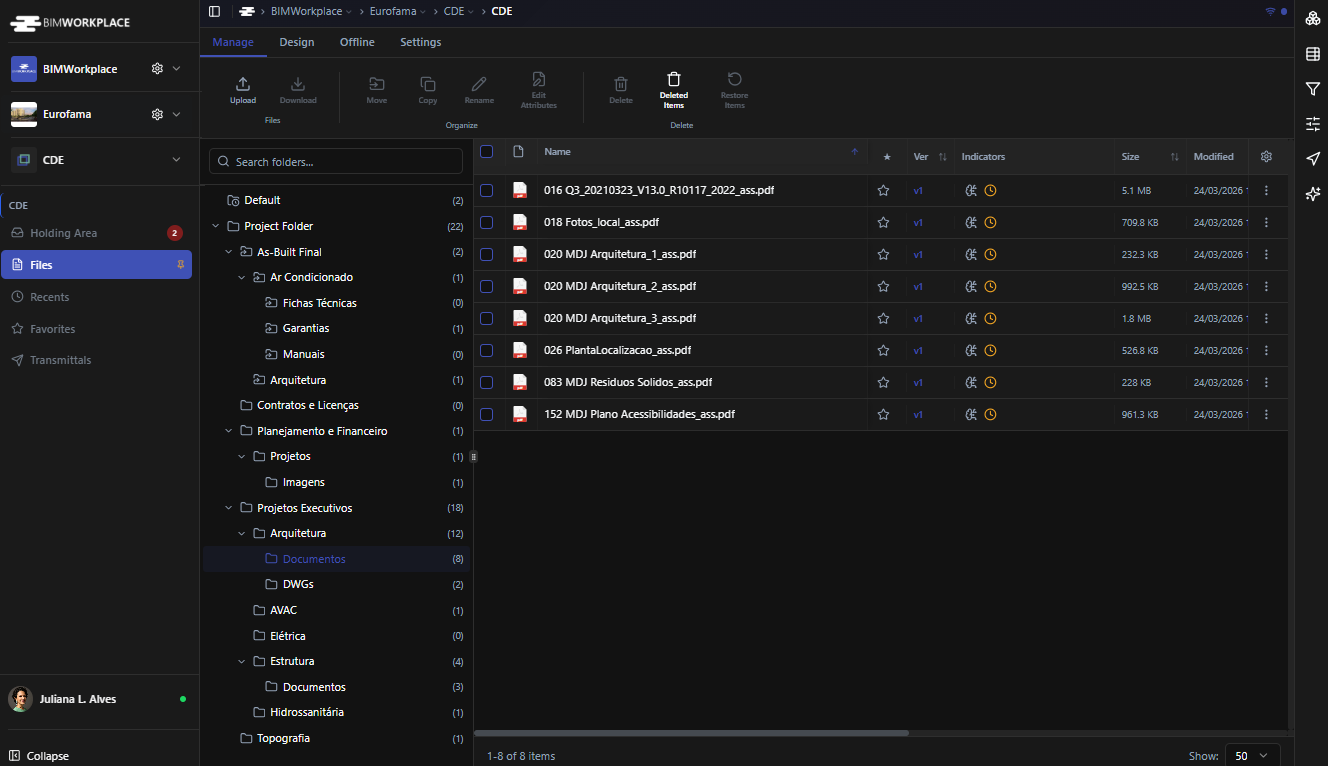
CDE Explorer
Browse folders and documents with bulk operations: move, copy, delete and restore.
Versions & History
Create and inspect document versions with a clear current-vs-historic model.
Derivatives
Manage viewer-ready and geometry derivatives (FRAG, Parquet metadata, more).
Annotations & Comments
Markup, pins and threaded discussion attached to documents and versions.
Naming Standards
Define and enforce naming rules per folder or project — ISO 19650 ready.
Transmittals
Create, list, filter and export transmittals with their associated documents.
Sharing & Saved Filters
Share documents and save filters to find what matters in seconds.
Secure Storage & Transfer
Signed URIs, streams and upload tokens — fluid UX without exposing raw storage.
File Logs
Background jobs and operation logs give visibility into long-running file work.
CDE Configuration
Project-level configuration for behaviour, defaults and governance rules.
Sync & Integrity
Reconcile document state between CDE, integrations and external partners.
Holding Area
List and count documents in a staging area before publication or destination.
Ready to unlock the full value of your BIM data?
Join 200+ construction teams already using BIMWorkplace 2.0.