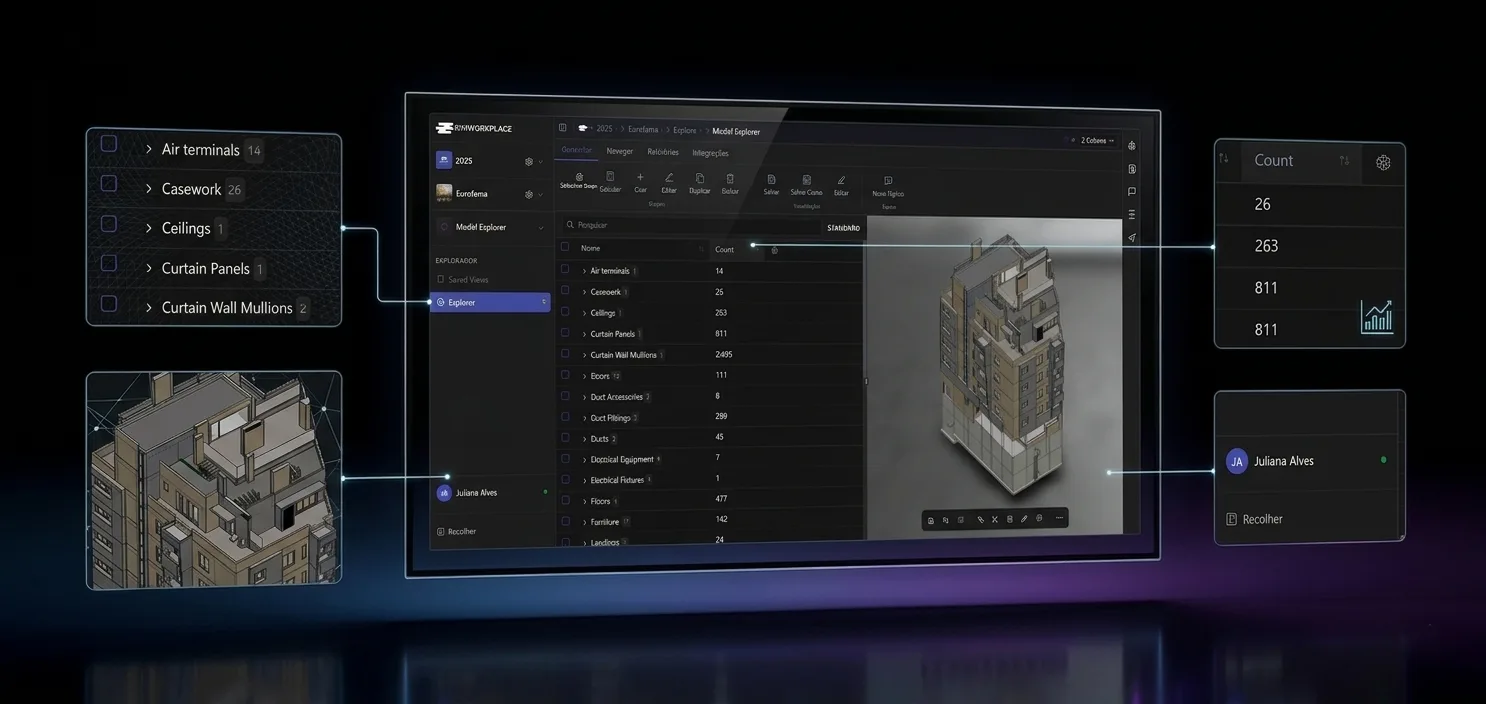
Your BIM data, in a spreadsheet you can actually work with.
Query, group, filter and bulk-edit element properties from federated models — with async loading for huge datasets and a two-way Excel round-trip.
The everyday pain of BIM reporting — gone.
Hover any card to see how BIMWorkplace solves it.
BIM reporting trapped in authoring software
Browse, filter and report on federated models without depending on Revit, Archicad or others.
Hover to see how we solve it →Authoring-tool independent reporting
Explorer reads your federated models directly — anyone can browse, filter and report in the browser, with no authoring license required.
Data scattered across files and disciplines
Views and groups concentrate columns, grouping and filters into one shared place per team.
Hover to see how we solve it →Shared views & groups
Curated views and groups consolidate columns, filters and grouping into one place — every team works from the same definitions.
Large models freeze the UI when queried synchronously
Heavy aggregations against federated models block the interface and frustrate users.
Hover to see how we solve it →Async aggregation engine
Async request → fetch ID → background aggregation keeps the interface responsive even on very large federations.
No room for ad-hoc analysis without saving everything
Every quick experiment forces you to alter or duplicate the saved view.
Hover to see how we solve it →Temporary filters
Experiment with cuts of data using temporary filters — explore freely without altering the saved view.
Editing properties one by one is painfully slow
Updating IFC properties element by element wastes hours and invites mistakes.
Hover to see how we solve it →Bulk grid editing
Edit instances and types in bulk directly in the grid — accelerate corrections and standardisation across the federation.
Teams still live in Excel
QS, planning and external partners depend on Excel — the BIM data never reaches them in sync.
Hover to see how we solve it →Excel round-trip
Export grouped data to XLS and import properties back — keep BIM aligned with QS, planning and external tools.
View clutter — no folder structure
Hundreds of saved views pile up flat, with no way to organise them by team or discipline.
Hover to see how we solve it →View folders
Organise Explorer views into folders by team, phase or discipline — with project-level limits and clear ownership.
No fine-grained control over who sees or edits what
Coarse permissions force the choice between locking everything down or opening everything up.
Hover to see how we solve it →Granular permissions
Dedicated permissions split read, edit, export and management responsibilities — give each role exactly what it needs.
Stale property references in saved views
When models change, saved views silently break — users see empty columns without knowing why.
Hover to see how we solve it →Validated groups
The system validates groups against active models and guides users to fix missing columns before they hit production.
Conflicts between grid edits and in-flight Excel jobs
Editing while an Excel import is running silently corrupts data.
Hover to see how we solve it →Job-aware safeguards
Built-in safeguards block incoherent edits while Explorer Excel jobs are running — no silent corruption.
Async grid for federated models
Request a view, get a fetch ID, let the backend aggregate in the background. The UI stays responsive even on huge datasets, with progress events streamed in real time.
Two-way Excel: export grouped data, import updated properties
Export any group to XLS for offline work, then re-import the spreadsheet to update properties in bulk — with job tracking and conflict safeguards.
Seven capabilities. One spreadsheet-grade grid.
Everything a project needs to read, report on and edit BIM data — at any scale.
View Folders
Create, rename and organise Explorer views by team, phase or discipline.
Groups & Views
Configure columns, group-by and filter rules — query simple, full or extended metadata.
Data Grid (v2)
Cell-structured grid with temporary filters and rich UI — the modern replacement for the flat v1 grid.
Bulk Grid Editing
Update properties across instances and types in one operation — set, clear and standardise at scale.
Excel Integrations
Export grouped data to XLS and import properties from Excel — with job tracking and limits.
Async Aggregation & Progress
Background processing with channelled progress and completion events — perfect for live UI updates.
Granular Permissions
Separate rights for browsing views, managing groups, exporting reports and editing properties.
Ready to unlock the full value of your BIM data?
Join 200+ construction teams already using BIMWorkplace 2.0.