Design
The BIMWorkplace Design module centralizes project coordination through topic management.
Topics can represent issues, clashes, RFIs, coordination notes, suggestions, or any other project item that needs to be discussed, assigned, tracked, and resolved.
All coordination information is stored in a cloud-based environment, helping teams work with consistent and up-to-date project data across design, construction, and operation.
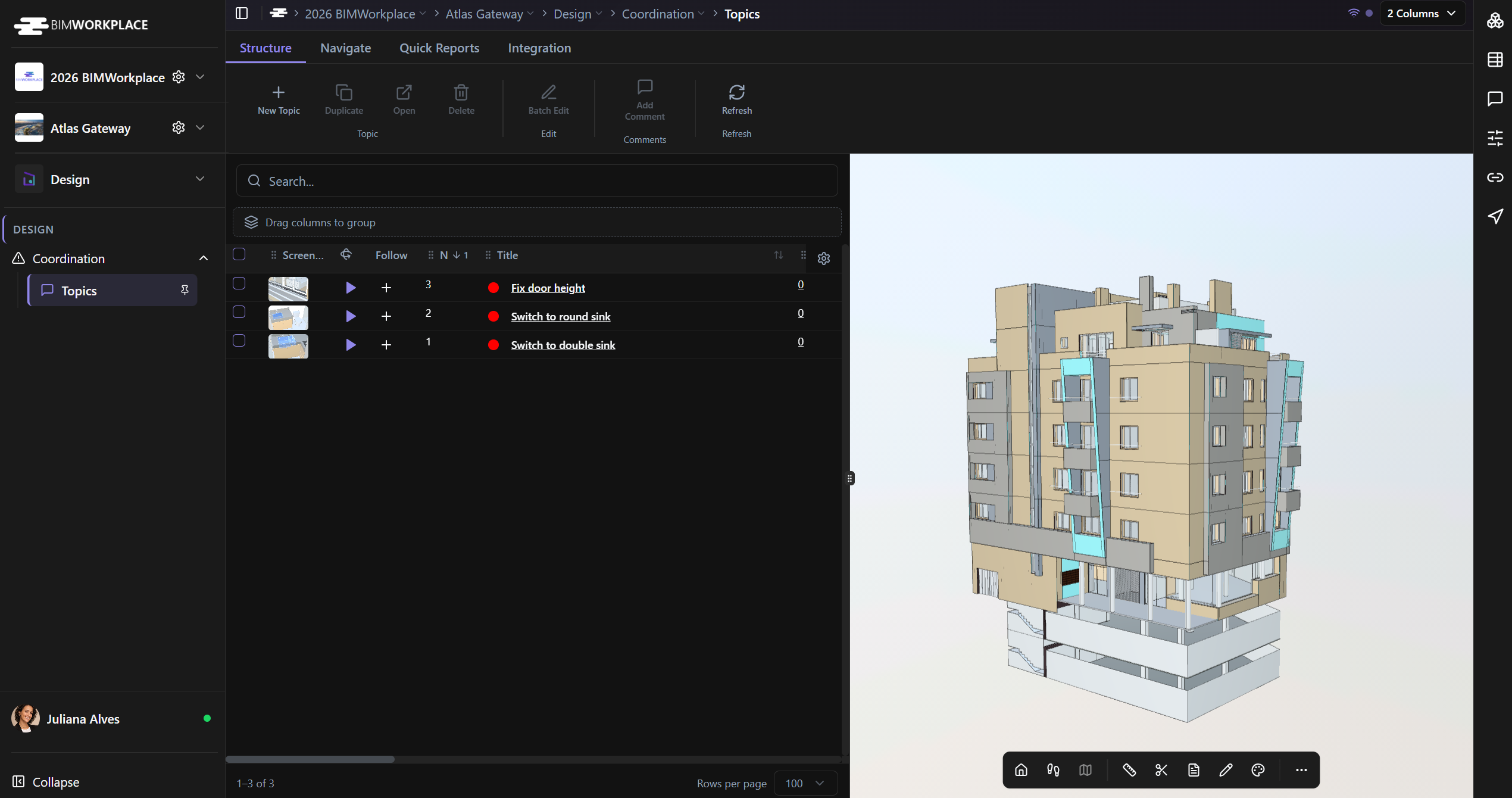
What the Design module is used for
Use the Design module to manage project communication around coordination items.
In the Design module, you can:
• Create and manage topics
• Assign topics to users or teams
• Add comments and track discussions
• Attach documents, images, and viewpoints
• Link clashes imported from Navisworks
• Use custom metadata to classify topics
• Control topic permissions by user, team, or company
• Generate reports in Excel or PDF
• Import and export coordination data using Excel
What a topic is
A topic is a structured coordination item inside the project.
It can be used to register:
• Design issues
• Clashes
• RFIs
• Suggestions
• Coordination notes
• Technical decisions
• Field observations
• Pending actions
Each topic can include a title, description, assignee, due date, status, priority, custom attributes, comments, attachments, viewpoints, and history.
Model-based coordination
Topics can be connected to the model through viewpoints.
A viewpoint helps users understand the exact model context related to the topic. It can include visible elements, hidden elements, filters, markups, or an image captured from the model.
This makes communication clearer because users can review the issue directly in context instead of relying only on screenshots or written descriptions.
Comments and solutions
Each topic includes a comment area where users can discuss the issue, add updates, attach images or viewpoints, and document decisions.
A comment can also be marked as the solution. This keeps the final resolution visible and easy to identify, even when the topic has a long discussion history.
Clash coordination
The Design module can work with the BIMWorkplace Navisworks plugin.
Using the plugin, teams can transform clashes, clash groups, tests, or viewpoints from Navisworks into topics in BIMWorkplace. These topics can then be assigned, tracked, commented on, and resolved in the cloud.
This helps BIM Managers maintain traceability from clash detection to resolution.
Permissions
Topics can be public or private.
For private topics, permissions can be defined by user, team, or company. This allows teams to control who can view, edit, or manage specific coordination items.
This is useful when a topic involves sensitive information, external collaborators, or a limited group of responsible users.
Reports and integrations
The Design module allows users to generate reports from project topics.
Reports can be exported in Excel or PDF format. If specific topics are selected, the report includes only those topics. If no topics are selected, the report includes all available topics.
The Integration area allows users to import BCF files into BIMWorkplace, helping bring coordination issues from external BIM tools into the project environment.
Why this matters
The Design module gives teams one structured place to manage project coordination.
By consolidating discussions, responsibilities, viewpoints, clashes, attachments, metadata, permissions, and reports in a single environment, BIMWorkplace improves transparency, traceability, and collaboration across all disciplines.
Was this article helpful?