Project Permissions
UI: Project Permissions
Audience: Workplace / project admins
Purpose
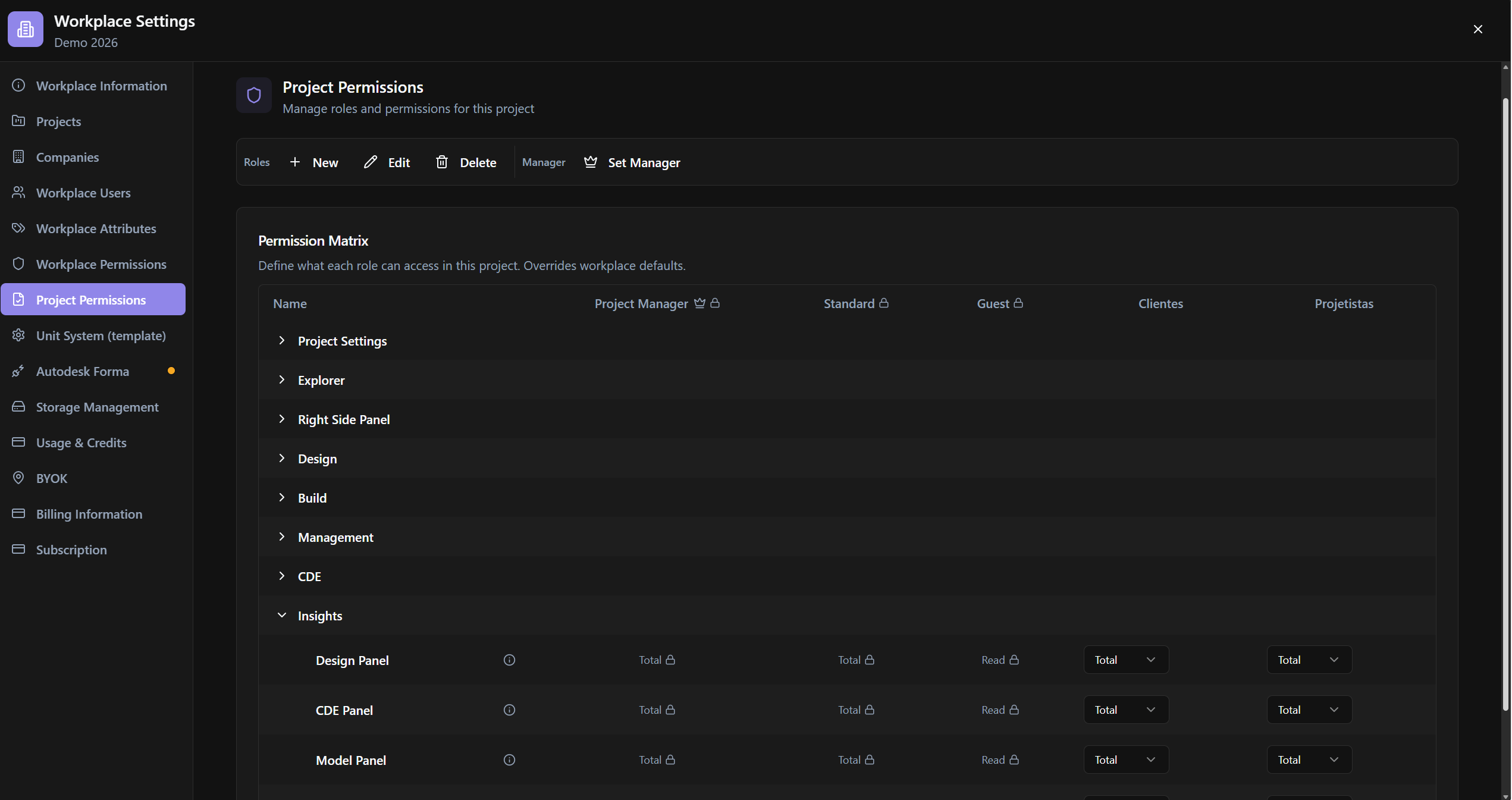
Manage project roles (overrides vs workplace defaults), permission matrix, and Set Project Manager.
Relevance
When the project overrides workplace defaults. A banner indicates active overrides.
Use Case Example
Admin selects Create Project Role, adjusts the matrix, and uses Set Manager on the Project Manager Role.
Who can use it
Admins with access to this section.
Screen Anatomy
Roles + New/Edit/Delete; Permission Matrix; Set Manager; overrides warning.
Options and fields
| Control | Function |
|---|---|
| New / Create Project Role | New role |
| Edit / Edit Project Role · Delete / Delete Project Role | CRUD |
| Set Manager / Set Project Manager · Manager | PM role |
| Permission Matrix | Read · None · Several · Total |
| Banner | This project has permissions that override workplace defaults. |
| Error | Cannot edit default role permissions |
How to use
- Workplace Settings → Project Permissions.
- Create/edit roles → matrix → Set Manager if necessary.
Links
Was this article helpful?