Unit System
Title: Unit System
Audience: Project Admins
Purpose
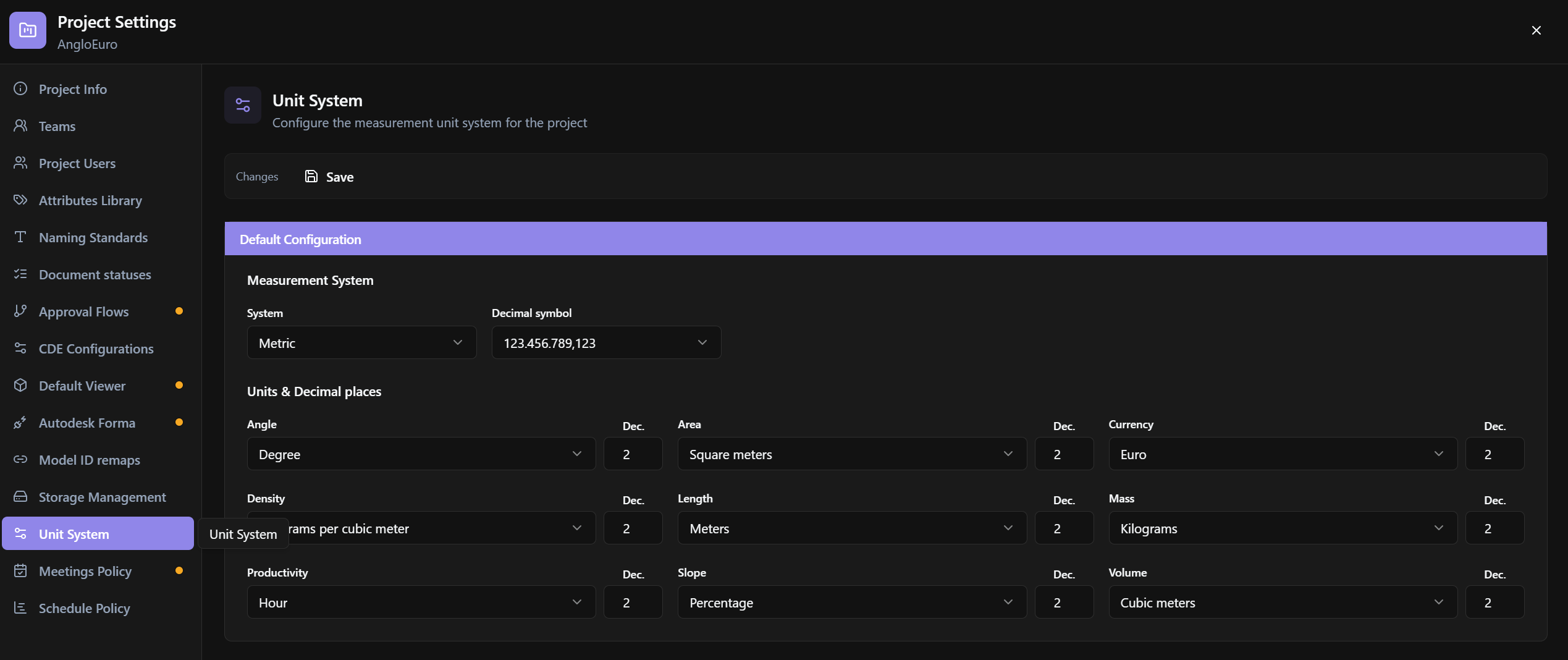
Configure the project unit system: Metric / Imperial / Both, decimal symbol, units, and decimal places per quantity.
Relevance
Affects QTO, viewer measurements, and numerical displays. If incorrect, it leads to inconsistent numbers between teams.
Usage example
The coordinator selects Measurement System = Metric, decimal , or ., adjusts Units & Decimal places by type, and clicks Save.
Who can use it
Project Settings. Without a project: Context unavailable. Please select a project.
Interface anatomy
- Unit System header + description.
- Changes / Save bar.
- Shared form (
UnitsConfigForm): system + decimals table.
Options and fields
Toolbar
| Control | Function |
|---|---|
| Changes · Save | Save changes |
Form
| Control | Function |
|---|---|
| Default Configuration | Default block |
| Measurement System / System | Metric · Imperial · Both |
| Decimal symbol | Decimal separator |
| Units & Decimal places | Unit × Dec. (decimal places) table |
How to use
- Go to Project Settings → Unit System.
- Choose system + decimal symbol + decimals.
- Click Save.
Links
Tips / common errors
- The Workplace template can be a starting point; overrides are saved at the project level.
Was this article helpful?