Document status
UI: Document status
Title: Document statuses
Audience: Project Managers / CDE admins
Purpose
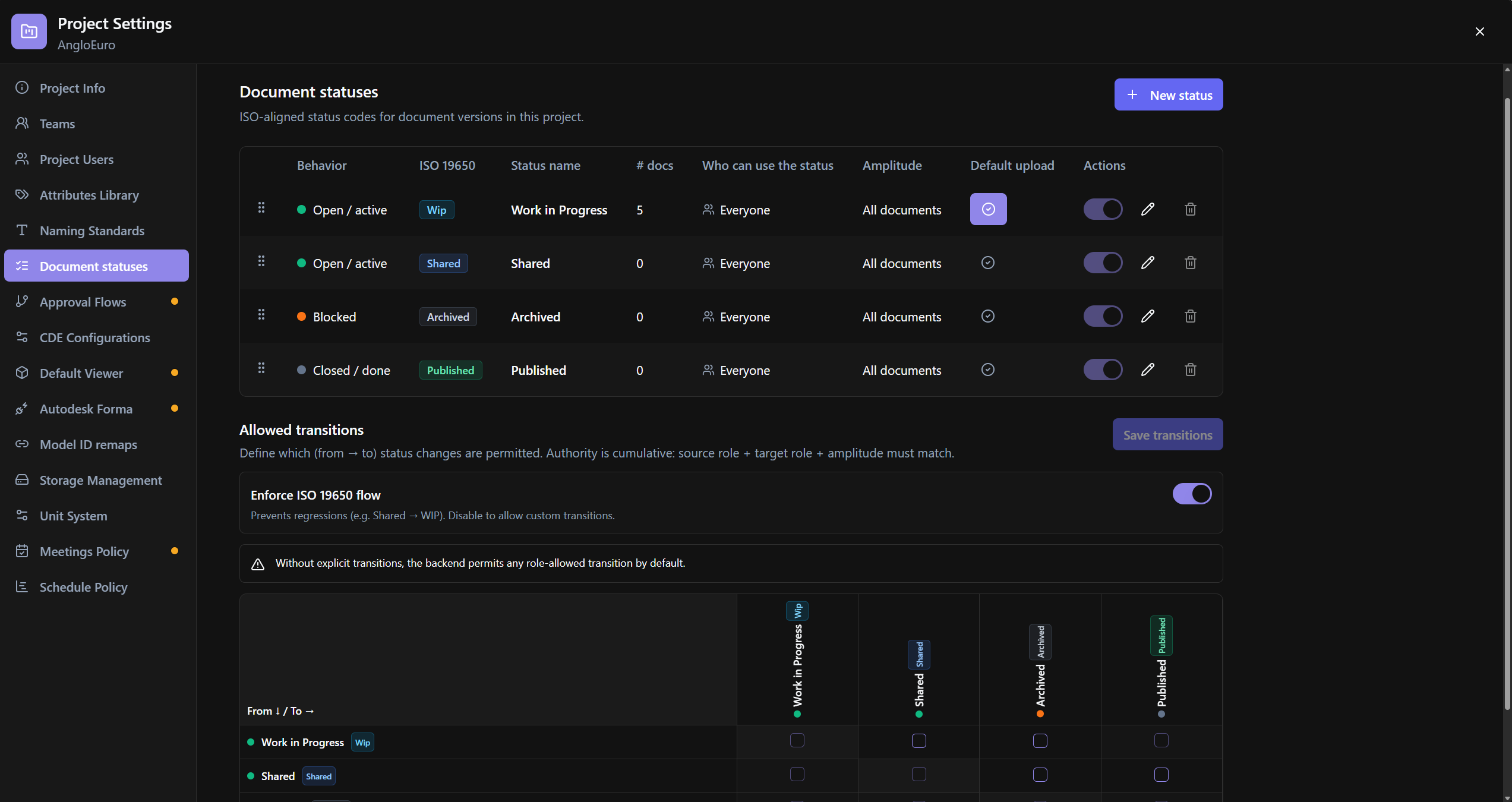
Define operational statuses for document versions (ISO-aligned): name, color, behavior, ISO stage, amplitude, roles, comment, upload default, and allowed transitions.
Relevance
Governs the life cycle within the CDE and reviews. Without an upload default and valid active combinations, the configuration will not save.
Usage example
The PM creates a New status, defines Behavior=Open, ISO stage, Set as upload default, configures the Allowed transitions matrix with Enforce ISO 19650 flow, and saves.
Who can use it
Project Settings; some edits to official statuses are restricted to Project Managers.
Screen anatomy
- List/table of statuses + New status.
- Create/Edit/Delete Sheet.
- Allowed transitions section (From/To matrix) + Save transitions.
Options and fields
List / columns
| Control | Function |
|---|---|
| New status | Create |
| Reorder | Sort |
| ISO 19650 · # docs · Who can use the status · Amplitude · Default upload · Actions | Columns |
| Active | Active state |
| Current upload default / Set as upload default | Upload default |
| Default locks | Requires comment; inactive blocked |
Who can use / Amplitude
| Value | Meaning |
|---|---|
| Everyone | Who can use (column) |
| Amplitude Person documents · Company & team documents · All documents | Reach |
Create / Edit status
| Control | Function |
|---|---|
| Status name | Label; official ones may have a built-in key (code ≠ label) |
| Color | Hex (#RGB / #RRGGBB) |
| Behavior | Open · Blocked · Closed |
| ISO stage | ISO Stage |
| Status amplitude | Amplitude |
| Requires comment | Forces comment |
| Allowed roles | Project roles that can use it |
Official: behavior/ISO locked; color/roles/amplitude/comment restricted to PM.
Delete
| Message | Meaning |
|---|---|
| Official default statuses cannot be deleted | System |
| …already used by documents | In use |
Allowed transitions
| Control | Function |
|---|---|
| Save transitions | Saves matrix |
| Enforce ISO 19650 flow | Prevents regressions (e.g., Shared→WIP) |
| Warning custom flow | Departed from ISO standard |
| Empty warning | No explicit transitions → backend allows role-allowed |
| Matrix From ↓ / To → | Allowed cells; self disabled; ISO blocked |
Save validations
- At least one active status per required combination (rules missing title).
- An upload default status is required before saving…
How to use
- Project Settings → Document status (BETA).
- New status or edit existing ones; define upload default.
- Configure transitions → Save transitions / general save.
Links
Tips / common errors
- A status with Requires comment cannot be an upload default.
- Blocked ISO transitions appear as Not allowed by ISO 19650 flow rules.
Was this article helpful?